Shipping AI Agent Work Safely: The Human Tag and the Rollback Window (Fleet Ledger, Part 1)
TL;DR: When coding agents produce most of your changes, the risky moment isn’t writing the code, it’s putting it in front of users. A person should make the release call, and a change should only count as finished after a watched period where undoing it takes one click.
This post is our developer-side companion to Part 1 of R Software’s five-part series, The Fleet Ledger Method. Their article lays out the full model. Here we zoom in on the two stages closest to your users, because that’s where a hosting platform either helps you or gets in the way.
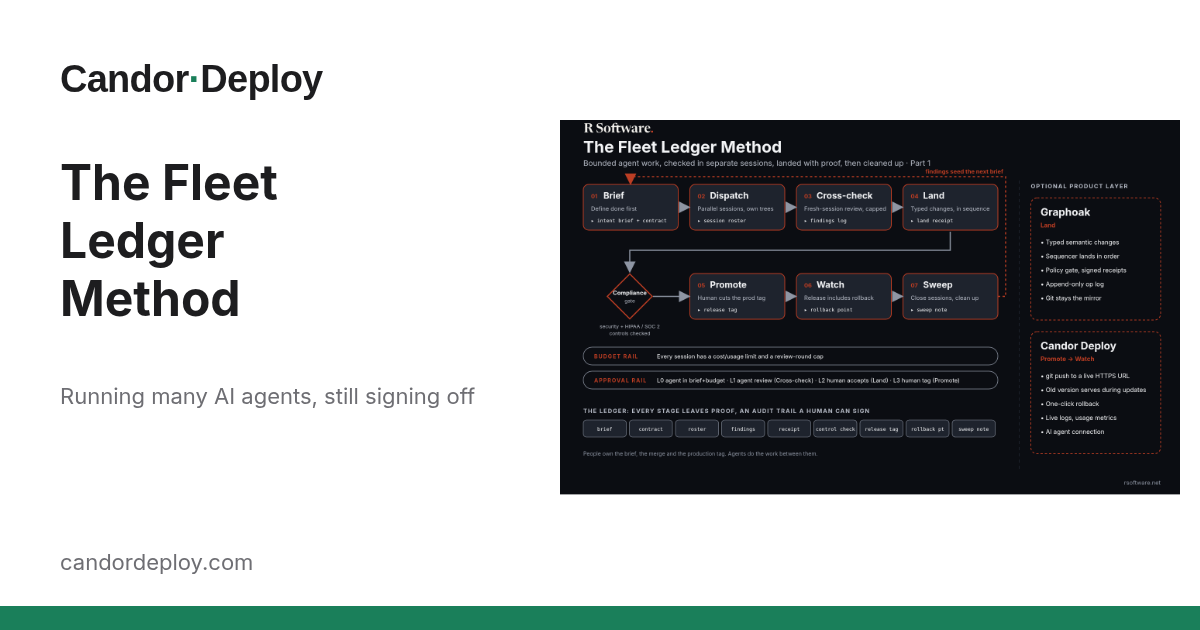
What is the Fleet Ledger Method, in one paragraph?
It’s a delivery model for teams running several agent sessions in parallel. Work moves through seven stages: Brief, Dispatch, Cross-check, Land, Promote, Watch and Sweep, with a compliance gate before Promote. A budget rail and an approval rail run underneath everything. Each stage leaves behind one piece of evidence, and that chain of evidence (the ledger) is what lets a human approve production without having watched every keystroke. The first four stages are about producing trustworthy changes. The last three are about releasing them, and that’s our focus.
Why should a human make the release call if agents wrote the code?
Because merging and releasing are different decisions. A clean review tells you the diff matches the brief. It can’t tell you whether today is a good day to ship, whether a customer demo is running in an hour, or whether three other changes are already queued behind this one.
In the method, Promote means a person approves production by cutting a version tag, and agents never promote themselves. On the approval rail, that’s the top level: L3, a human production tag.
In practice that looks like:
- Agents may open branches and pull requests, and a fresh session reviews them.
- A person merges, then marks the release with a tag such as
v1.14.0. - The tag is a record of who said yes, and when.
How the tag maps to your deploy is a choice you make. On Candor Deploy, every push to your connected branch goes live (how it works). So a simple, honest setup is to keep a release branch that only people push to, and cut the tag at the same commit. Agents work on feature branches; a human moves the release branch forward. The deploy follows the human decision, not the agent’s.
What makes a release “done”?
Shipping isn’t the finish line. In the method, Watch says a release includes a rollback window, and the change doesn’t count as complete until the signals look right during that window.
That turns a vague feeling (“seems fine?”) into a short, explicit checklist you can write down before you ship:
- What to look at. Error rate, memory, response traffic, and the app’s own logs for the paths you changed.
- For how long. Fifteen minutes for a copy change; a full business day for a billing change. Pick it up front.
- What triggers a rollback. For example: errors above your normal baseline, or any new exception from the code you touched.
- Who decides. Usually the same person who cut the tag.
Write those four lines next to the tag and you have the “rollback point and signal note” entry the ledger asks for.
What does a rollback window need from the platform?
A rollback window is only real if rolling back is cheap. If undoing a release means rebuilding an old commit and hoping, people stretch their luck instead of reverting. Here’s what Candor Deploy gives you for that window, all from the live product page:
- One-click rollback. Every earlier deploy has a Rollback button, so the trigger in your checklist maps to one action.
- A bad build doesn’t replace a good one. Updates roll out while the old version keeps serving, and the new version has to start and answer before the old one stops. If the new version fails to start, the previous one stays up.
- Signals you can actually read. Live logs stream your build and your app’s output, and the build log for every deploy is kept. Usage shows CPU, memory, traffic and errors right now, with history over the last hour, day or week.
- Agents can read the signals too. If you connect your coding agent, it can call
deployment_status,build_logs,service_usageandservice_metrics. That’s useful for drafting the signal note, but the rollback decision stays with a person.
Note what’s not on that list: we don’t roll back automatically, and a tag doesn’t trigger a deploy by itself. The human pushes, the human watches, the human decides.
How do production signals feed the next brief?
The last stage, Sweep, closes sessions and cleans up. It also carries what you learned forward. Whatever you saw during the Watch window (a slow endpoint, a noisy log line, a memory bump) becomes input to the next brief. Your signals feed the next round of work instead of evaporating once the window closes.
Even a one-line note helps: “v1.14.0: memory up about 20% on the export job, look at batching.” The next agent session starts with evidence instead of guesses.
What’s coming in this series?
R Software is publishing the rest of the method over the next week or so, and we’ll post a developer-focused companion for each part:
- Part 2: writing “done” so it includes how you’ll roll back.
- Part 3: letting agents read build logs and deploy status.
- Part 4: the human tag as the promote decision.
- Part 5: the rollback window, live logs and metrics in depth.
Read the full model in R Software’s Part 1.
Try it on your next release
Pick one change an agent is working on this week. Before it ships, write the four-line Watch checklist, have a person cut the tag, and keep the rollback one click away. If you’d like a platform where that last part is built in, deploy your repo on Candor Deploy.
Written with help from our AI assistant.